

Quick guide
Update a Technion Phone Number
How employees update their work phone number: sign in to the Technion portal at portal.technion.ac.il, update the phone number, and the new number will appear in the phonebook the day after saving.
Open portal: portal.technion.ac.il
The portal is available only from within the Technion network, or from a home computer configured for Technion access.
1
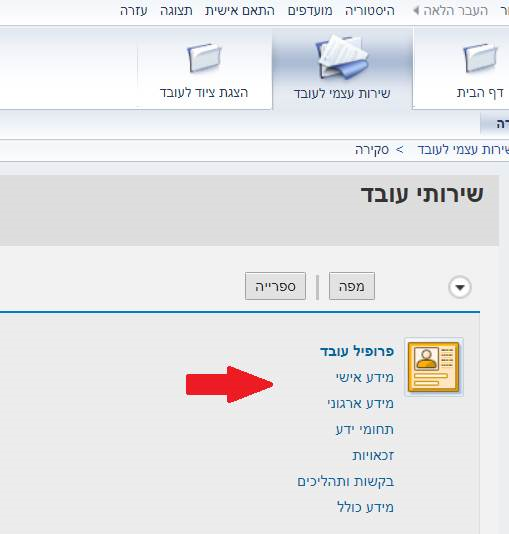
Choose: Employee Self Service, Personal Information
After signing in to the Technion portal, open the employee services area. In the menu, choose Employee Self Service, then Personal Information.
2
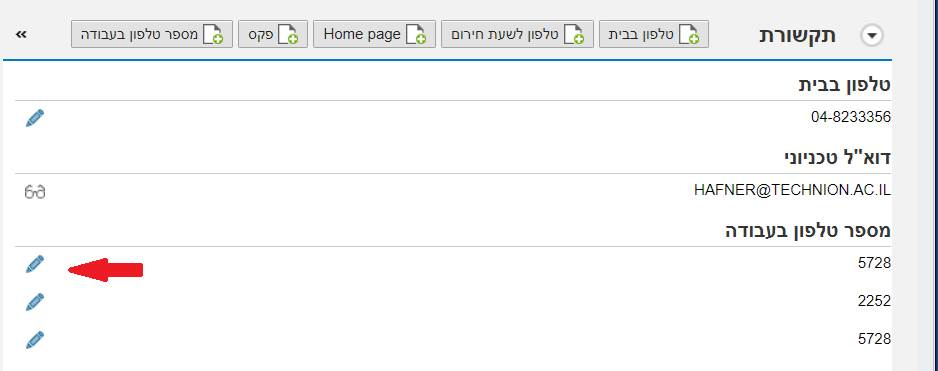
Choose: Communication, Work Phone Number
Inside Personal Information, choose Communication, Work Phone Number, and click the edit icon to update the phone number.
After saving
Update the phone number and click Save. The new number will appear in the phonebook the day after the change.
Note: the current interface does not allow deleting a phone number. To remove it, enter a dot instead of the old number.